3D Mechanical Scorpion Puzzle: Motorized Lights & Motion
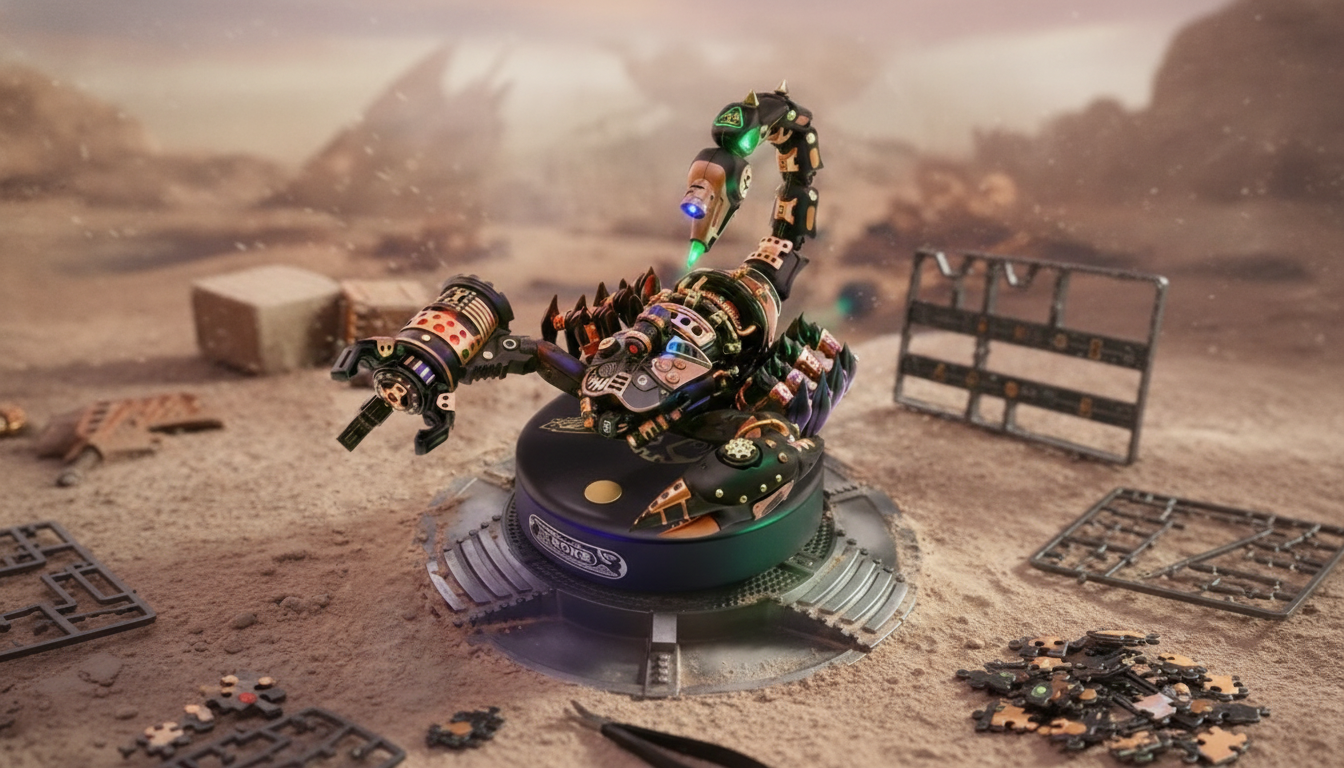
3D Mechanical Scorpion Puzzle with Motor, Lights & Motion: Build a Moving Kinetic Creature
A build that doesn’t just sit on a shelf—this 3D mechanical scorpion puzzle assembles into a motorized model with lighting and animated motion. It’s part engineering project, part desk display, and part hands-on challenge for anyone who enjoys mechanical builds, creature designs, and kinetic gadgets. If you like models that reward patience with a satisfying “it’s alive” payoff, the 3D Mechanical Scorpion Puzzle with Motor, Lights & Motion is designed for exactly that kind of build-and-run experience.
What Makes This Scorpion Build Different
Most 3D puzzles end with a finished shape. This one ends with a working mechanism—something you can power on and watch perform. That change in end goal (from “assembled” to “assembled and moving”) makes the whole project feel more like a small mechanical build than a typical model kit.
- Assembles into a scorpion-shaped mechanical model designed to move once powered.
- Motorized motion creates a kinetic “alive” effect that stands out from static 3D puzzles.
- Lights add display appeal for desktops, shelves, or dim rooms.
- Build process encourages careful sequencing, patience, and attention to moving parts.
The creature styling is the fun hook, but the real satisfaction comes from the interplay of structure and motion—building linkages, aligning connections, and seeing the scorpion’s silhouette look more dynamic once it’s running.
How the Motion and Lighting Come Together
At the core is a motor-driven system where rotation is translated into repeated movement through mechanical linkages. In other words: a spinning drive becomes a rhythmic animation that reads like crawling or creeping—perfect for a scorpion-inspired kinetic model.
- Mechanical linkages translate motor rotation into repeated limb or body movement for a crawling/creeping style animation.
- Keeping gears, joints, and connection points aligned during assembly helps prevent binding and uneven movement.
- Lights are positioned to emphasize the silhouette and mechanical details once the model is running.
- After assembly, a quick check of moving clearances (legs, tail, body panels) helps ensure smooth operation.
Quick Build-and-Run Checklist
| Step | What to check | Why it matters |
|---|---|---|
| Before powering on | No loose pieces; joints fully seated | Prevents wobble and accidental disengagement |
| Gear/drive area | Nothing rubbing; parts aligned | Reduces friction and stalling |
| Leg and tail clearance | No parts catching on the surface | Improves visible motion and stability |
| Lighting check | Connections secure; lights positioned correctly | Keeps the display effect consistent |
If you enjoy the “why” behind the build as much as the result, hands-on STEM-style projects are a great way to practice real-world problem solving and iterative troubleshooting. Resources like NASA STEM Engagement and the Smithsonian Science Education Center highlight the value of learning by building, testing, and refining—exactly the same rhythm you’ll follow when tuning a moving model for smooth operation.
Where It Fits Best: Desk Display, Gift, or Build Night
This scorpion model is easiest to appreciate when it has room to be seen and a reason to run. It’s both a conversation piece and a “show, don’t tell” demonstration of simple mechanical motion.
- A standout desk piece for fans of mechanical creatures, robotics-inspired décor, or unusual collectibles.
- A gift option for builders who enjoy kinetic models, hands-on puzzles, and STEM-style projects.
- Works well as a weekend build or an evening project with a clear workspace and good lighting.
- Pairs nicely with a display base or shelf spot where the motion can be seen from multiple angles.
For builders who like documenting builds or checking alignment at close range, an overhead view can be surprisingly helpful. The Heavy-Duty Articulating Overhead Camera Mount can make it easier to record steps, review small placements, or keep your work area hands-free while you assemble moving parts.
Tips for a Cleaner Build and Smoother Movement
Because the end result is kinetic, small build habits have a bigger impact than they would on a static puzzle. The goal is consistent motion—no catching, no scraping, and no uneven stride.
- Sort pieces before starting to reduce missteps and speed up assembly.
- Follow the sequence carefully around the drive and linkage areas; rushing early steps can affect later alignment.
- Use a flat, stable surface for testing motion so the scorpion’s movement reads clearly and stays steady.
- If motion looks uneven, re-check the joints and re-seat any parts that feel slightly off-axis.
A practical approach is to pause at major milestones and do a gentle “range of motion” check—move linked parts by hand (without forcing anything) to confirm the pathway is clear. If something feels tight, it’s usually faster to correct it immediately than to diagnose it after everything is fully closed up.
At-a-Glance Product Details
| Item | Details |
|---|---|
| Name | 3D Mechanical Scorpion Puzzle with Motor, Lights & Motion |
| Price | $69.01 USD |
| Stock status | In stock |
| Theme | Mechanical creature / kinetic model |
To see current availability and full product specifics, visit the 3D Mechanical Scorpion Puzzle with Motor, Lights & Motion product page.
FAQ
Does the scorpion actually move after it’s built?
Yes. It’s designed as a motorized model that animates once assembled and powered, creating visible kinetic motion. Smooth movement depends on careful alignment of the drive area, joints, and linkages during assembly.
Are the lights decorative or part of the mechanism?
The lights are primarily for visual effect and display impact. They work alongside the motion to highlight the model’s shape and mechanical details rather than powering the movement.
What’s the best way to troubleshoot if the motion looks uneven?
Start by checking for binding: re-seat any joints that feel slightly off-axis, confirm nothing is rubbing in the gear/drive area, and verify leg and tail clearances on a flat surface. Small alignment fixes typically make the biggest difference in how consistent the motion looks.








Leave a comment